
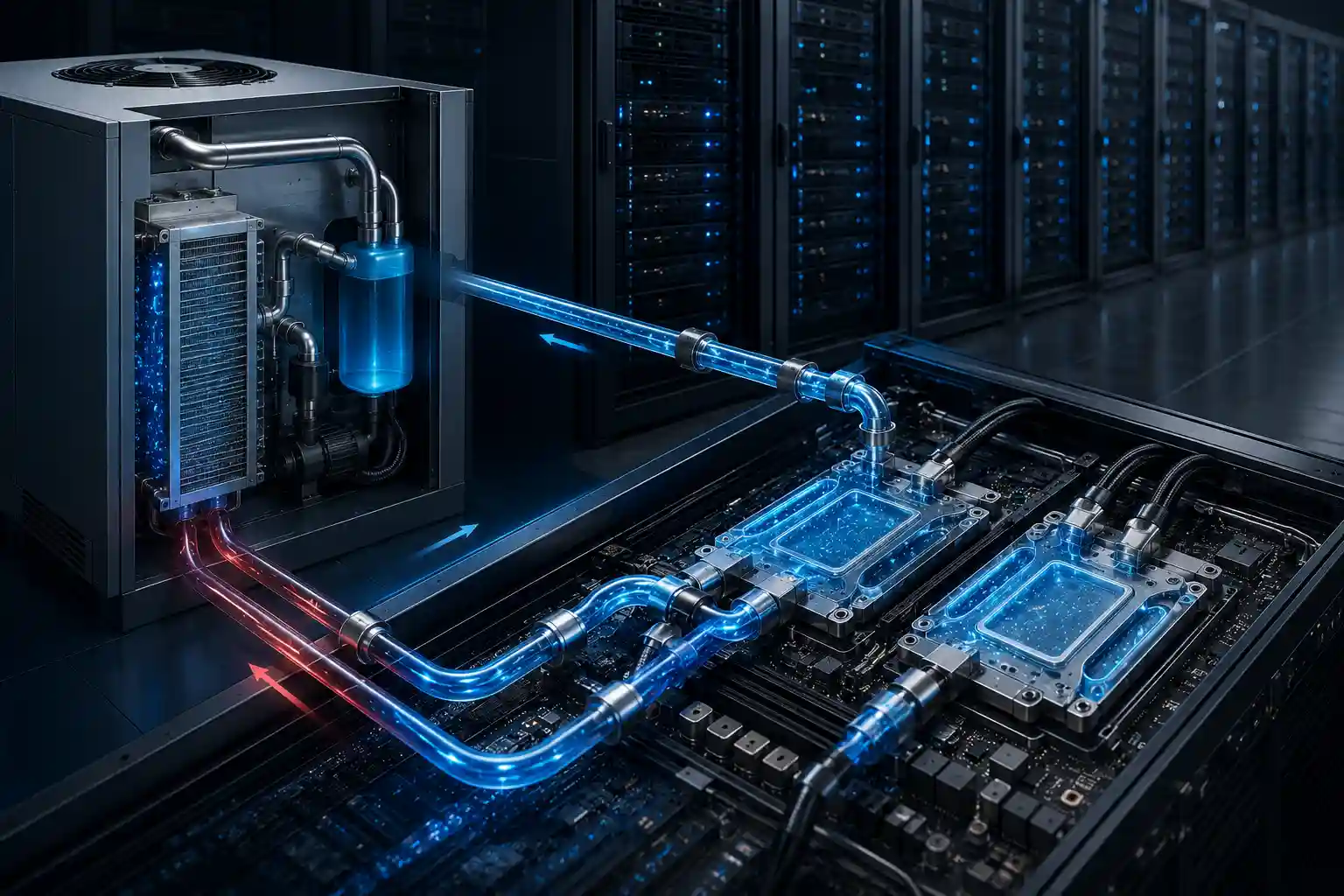
Liquid cooling is a way of removing heat from electronics by circulating a fluid, usually water or a water-glycol coolant, past the hottest components instead of relying on air alone. Because liquid carries far more heat per unit volume than air, it can cool high-power chips in a smaller space and with less fan noise. You’ll find it in gaming PCs and workstations, AI servers and data centers, EV battery packs, lasers, and power electronics.
The pressure to adopt it is highest in data centers. AI training and high-performance computing (HPC) are pushing rack power into territory air was never built for: Uptime Institute puts the practical limit of air cooling at roughly 50 kW per rack, while NVIDIA’s reference architecture for the GB300 NVL72 calls for up to 142 kW per rack, according to Data Center Knowledge. No amount of extra fan speed or airflow tuning changes the fact that air simply can’t carry heat away fast enough at that scale. That’s why more and more data centers are turning to liquid cooling.
What Is Liquid Cooling?
Liquid cooling is a thermal management technique that uses a liquid — typically water or a dielectric coolant — instead of air to absorb and carry away heat from CPUs, GPUs, servers, batteries, and other electronics. Because liquid transfers heat far more efficiently than air, it’s especially well suited to components that pack a lot of power into a small area, from a high-end desktop processor to a rack of AI accelerators.
The coolant itself matters as much as the hardware. Most systems run deionized water or a water-glycol mix such as PG25, while immersion systems use dielectric fluids that don’t conduct electricity. Our coolant guide compares the options.
How Liquid Cooling Works
Every liquid cooling system, from a desktop PC to a data hall, is built from the same four parts:
- A heat collector that sits on the hot component: a water block on a PC processor, or a cold plate on a server CPU or GPU.
- A pump that keeps the coolant moving.
- A heat exchanger that dumps the heat somewhere else: a fan-cooled radiator in a PC, or a coolant distribution unit (CDU) that hands it off to facility water in a data center.
- Tubing, fittings, and coolant that tie the loop together.
The core idea is simple: get the coolant as close as possible to the heat source, let it absorb the heat, then move it out. What separates one architecture from another mostly comes down to how close the coolant gets to the chip — the closer it gets, the more precise (and complex) the system becomes.
In a PC or Workstation
A water block with a small built-in pump mounts on the CPU (or a full-cover block on the GPU). Coolant carries the heat through tubing to a radiator, where fans blow it into the room air. The heat still ends up in air; liquid simply moves it from a cramped spot on the motherboard to a large radiator where it’s easier to get rid of, which is why a liquid-cooled PC can run quieter and hold higher boost clocks under sustained load.
In Servers and Data Centers
In a cold-plate setup, the coolant never touches the chip directly. Instead, it circulates inside a metal cold plate mounted flush against the chip surface, pulling heat through the plate material and carrying it back through a rack manifold and quick disconnects to the coolant distribution unit (CDU), which manages flow and temperature before sending the heat out for rejection.
How that final heat gets rejected to the outside world varies by facility. Some sites use dry coolers that reject heat straight to outside air with no water consumption. Others rely on cooling towers or chillers, particularly where climate or density requirements call for it. Because liquid-cooled loops can often run at higher supply temperatures than a chilled-water air-cooling system needs, many facilities get extra hours of “free cooling” — using outside air to cool the loop directly — which is one of the quieter reasons liquid cooling tends to lower energy use compared to older cooling architectures.
Why Liquid Cooling Is Gaining Ground
The main driver behind this shift is the relentless push for compute density in AI training clusters and HPC applications. Once per-rack power draw exceeds what air cooling can handle, operators are left with two options: scale back rack density (which means more floor space and higher build costs) or move to liquid cooling to keep density high. Cooling capacity aside, the efficiency gains matter just as much. Liquid cooling cuts the fan power inside servers and lets the facility run warmer coolant, which reduces how hard chillers have to work and improves PUE (power usage effectiveness). Lower noise and vibration are real benefits too, even if they get less attention than the efficiency numbers.
There’s also a sustainability angle beyond raw efficiency. Because liquid coolant can run at higher temperatures than the air stream in a traditional system, the resulting waste heat is often warm enough to be captured and reused — for district heating, industrial processes, or preheating other systems on site — something that’s much harder to do economically with the diffuse, lower-grade heat an air-cooled system rejects.
Outside the data center, the same physics drives adoption wherever power density is rising: CPUs and GPUs in desktops and workstations, EV and energy storage battery packs, IGBT and SiC power modules, and lasers that need tight temperature stability.
Main Types of Liquid Cooling
Liquid cooling isn’t one technology — it’s a family of approaches, each suited to a different situation. The first two are mainly found in PCs and workstations; the rest are data center and server architectures.
All-in-One (AIO) Liquid Coolers
An AIO cooler is a sealed, pre-filled loop: water block and pump on the CPU, a radiator with fans, and tubing in between. It ships ready to install and needs no refilling, which makes it the most common way to liquid-cool a desktop processor. APALTEK builds AIO coolers such as the AP-AIO-240, along with other closed-loop liquid cooling modules for gaming and DIY PCs. For how sealed loops are built and where they fit, see what a closed-loop liquid cooling module is.
Custom (Open-Loop) Liquid Cooling
A custom or open-loop system is assembled from separate parts: water blocks for the CPU and often the GPU, a pump and reservoir, one or more radiators, and fittings. It cools more components and can handle higher combined heat loads, at the cost of more installation work and periodic maintenance. Our guide to open-loop liquid cooling modules covers the trade-offs.
Direct-to-Chip / Cold Plate (D2C)
This is the most widely deployed form of liquid cooling in data centers today. A metal cold plate mounts directly onto the CPU, GPU, or other heat-generating component, and coolant flows through a closed loop to absorb and remove heat. D2C targets the biggest heat sources in the rack with precision, requires relatively contained changes to the server itself, and has become the default path for AI and HPC clusters. Most systems are single-phase; two-phase cold plates, where the coolant boils inside the plate, target the very highest chip powers. For the hardware itself, see what a direct-to-chip cold plate is and how to choose a server GPU cold plate.
Rear-Door Heat Exchanger (RDHx)
An RDHx mounts on the back of the rack and cools exhaust air with a water-cooled coil before it re-enters the room. Its biggest advantage is how little it disrupts existing infrastructure — no changes to the servers themselves are needed, which makes it a strong fit for existing facilities that need to raise density gradually. It’s also typically the lowest-cost entry point among liquid cooling options, since it’s essentially a door swap plus a water hookup — a far smaller project than adding a CDU or reworking the floor. The trade-off is a lower density ceiling than cold-plate or immersion systems, because the servers themselves are still air-cooled.
Immersion Cooling
Immersion systems submerge the entire server in a bath of dielectric coolant, putting fluid in direct contact with every heat-generating component. Single-phase systems keep the fluid liquid and circulate it through a heat exchanger; two-phase systems let it boil on hot surfaces and condense it back. Both remove heat from every component at once, including memory and power circuitry that cold plates may not cover. The catch is higher upfront cost and a strong preference for greenfield builds, since retrofitting immersion into an existing facility means reworking tanks, floor loading, and often the entire mechanical room. APALTEK’s IDC immersion cooling system is a single-phase design. For a side-by-side comparison, see direct-to-chip vs. immersion cooling.
Liquid-Assisted Air Cooling
A hybrid step between air and full liquid cooling: a small liquid loop inside the server moves chip heat to a radiator in the chassis, and the server’s own fans carry it out as air. It raises the cooling ceiling of an air-cooled server without needing facility water. See what liquid-assisted air cooling is.
Liquid Cooling vs. Air Cooling
| Factor | Air Cooling | Liquid Cooling |
| Heat transfer medium | Air (fan-driven) | Water, water-glycol, or dielectric coolant |
| Data center rack density | Practical limit around 50 kW per rack (Uptime Institute) | Direct-to-chip racks commonly 100 kW+; immersion higher |
| Energy use | Fans and chillers carry the full load | Less fan power; warmer coolant allows more free cooling |
| Noise and vibration | Higher | Lower |
| Cost and complexity | Lowest; standard architecture | Higher; adds pumps, plumbing, and leak management |
| Retrofit difficulty | Low (standard architecture) | Varies — moderate for cold plate/RDHx, higher for immersion |
The table makes the trade-off pretty clear: air cooling stays simplest and cheapest to deploy, but it tops out well below what AI-era workloads now demand. Every liquid cooling option buys higher density and better efficiency — the question is which one fits a given facility’s constraints. In a desktop PC the gap is narrower: a good air cooler handles most processors, and liquid cooling earns its place on high-power CPUs and GPUs, compact builds, and systems where noise matters.
How to Choose the Right Liquid Cooling Approach
There’s no one-size-fits-all answer here — the choice comes down to three variables: target power density per rack, whether the project is a new build or a retrofit of an existing facility, and budget and supply-chain timelines. For a moderate density increase inside an existing room, RDHx or cold-plate systems are usually the more realistic call. For the highest densities, and especially on new builds, direct-to-chip at scale or immersion becomes worth the added infrastructure. Beyond density alone, coolant compatibility with equipment materials and how the CDU integrates with the facility’s existing water system are engineering details that need to be verified during the selection phase — not discovered during installation.
Budget matters just as much as density. Entry cost scales roughly with how invasive the system is: RDHx tends to be the cheapest way in, since it’s largely a door swap and a water connection. Cold-plate systems cost more once the CDU, distribution piping, and rack-level plumbing are factored in. Immersion sits at the top of the cost curve because of the tanks, fluid volume, and floor infrastructure involved — a cost worth paying only when the density and efficiency gains actually translate into savings elsewhere, such as reduced facility footprint or lower long-term energy spend.
It’s also worth setting expectations early: liquid cooling rarely eliminates air cooling entirely. Many facilities run a hybrid setup, where liquid handles the highest-density racks and air cooling continues to serve auxiliary equipment and lower-density areas — which means the selection question is often “how much liquid cooling” rather than “liquid versus air.”
For a PC or workstation the decision is simpler: an AIO is the low-maintenance choice for cooling a CPU, while a custom loop makes sense when you want to cool the CPU and GPU together or push sustained performance and low noise further.
From Design to Deployment: An Engineering and Manufacturing Perspective
Most content on liquid cooling stops at explaining what it is and why it matters. What actually determines whether a liquid cooling project succeeds, though, comes down to engineering details in the design and manufacturing stage: the fit tolerance between a cold plate and the chip surface, CDU stability across varying water temperatures, and the reliability of piping connection seals. These aren’t things a standardized off-the-shelf product can just handle. As a manufacturer focused on the R&D, design, and volume production of liquid cooling products, APALTEK designs and builds custom cold plates and liquid cooling modules, and can deliver them as part of a complete loop with CDUs, manifolds, and pre-installed quick disconnects, leak tested as a full assembly. Every unit is helium leak tested before it ships. The goal is turning a liquid cooling plan into a system that actually runs reliably, not just a spec sheet.
That engineering process typically starts with the customer’s thermal load profile and facility constraints — target kW per rack, available water temperature and flow rate, footprint, and whether the deployment is a retrofit or a new build. From there, cold-plate geometry, CDU sizing, and manifold layout get modeled and validated before moving into production, so the design that ships has already been tested against the operating conditions it will actually see in the field, not just idealized lab conditions. If you’re scoping a project, our guide to preparing an RFQ for a custom cold plate lists the inputs we need.
Frequently Asked Questions
Does liquid cooling completely replace air cooling? No. Even in heavily liquid-cooled facilities, most deployments keep some air cooling in place for lower-density components and auxiliary equipment — liquid handles the racks generating the most heat, and air covers the rest.
Is liquid cooling only relevant for hyperscale AI data centers? No. It’s most visible there today, but the same principles apply anywhere heat density outpaces what air can remove: gaming PCs and workstations, HPC clusters, edge sites with limited footprint, enterprise data halls running GPU workloads, EV batteries, and power electronics.
Do I need liquid cooling for my PC? Usually not. A good air cooler handles most desktop processors. Liquid cooling is worth it for high-power CPUs and GPUs that run under heavy sustained load, small cases with little room for a large heatsink, or builds where low noise is a priority.
What’s the difference between direct-to-chip and immersion cooling? Direct-to-chip circulates coolant through a cold plate mounted on top of the chip, so the fluid never touches the component directly. Immersion submerges the entire server in dielectric fluid, putting coolant in contact with every part at once. Immersion generally supports higher density, but direct-to-chip is easier to retrofit into an existing server design.
Do liquid cooling systems risk leaks damaging equipment? Leak risk is a legitimate engineering concern, which is why connector quality, seal design, and leak-detection sensors matter as much as the cooling architecture itself. Well-engineered cold-plate and CDU systems use dripless quick disconnects and monitored loops specifically to manage this risk.
Does liquid cooling need maintenance? It depends on the system. A sealed AIO needs essentially none during its service life. Custom PC loops need periodic coolant changes. Data center loops are monitored continuously, with coolant quality checked and filters serviced on a schedule set by the CDU and coolant supplier.
Can liquid cooling be added to an existing data center, or does it require a new build? It depends on the type. RDHx and, to a lesser extent, direct-to-chip systems can typically be retrofitted into existing rooms with manageable downtime. Immersion cooling is much harder to retrofit — it generally requires the floor loading, containment, and mechanical infrastructure of a greenfield design.
Ready to Move to Liquid Cooling?
If you’re evaluating a move from air to liquid cooling, or need a cold plate or CDU built around a specific power density target, reach out to APALTEK’s engineering team. Share your rack power requirements and facility conditions, and we’ll help you assess the right liquid cooling architecture and put together a custom solution. You can also browse our cold plates and liquid cooling modules.